Eggnog for the mind...

I once heard it said that those who can read but don't are no better off than those who cannot read at all.

The same can be said for those who have a camera and only know what came to them by flipping a few of the camera control switches or never read anything beyond the "Quick Start" guide. Sure on occasion you will get an outstanding image, but be honest, most of the time your images will fall into the "hey, these don't suck" category.

Or you have Photoshop but never read a book or took a course and when you see others peoples Photoshop work your wonder "how did they do that"? You are missing out on so much!

I know, I know, technical books have been used to put insomniacs to sleep, or worse, attempting to read them can be more painful than a stick in the eye. If you live outside of the "big city" training courses are few and far between. So what do you do?

Well, do I have some news for you! Kelby Training is now offering online training of the highest quality and at an obscenely low price. Here are just some of the instructors:

The Photoshop Studs (Scott Kelby, Dave Cross, Matt Kloskowski)
Bert Monroy
Joe McNally
Terry White
Moose Peterson
Vincent Versace
Dan Margulis

And the subjects that are covered go far beyond Photoshop, they cover on camera flash, lighting, Lightroom, marketing, workflow, landscape photography, black and white artistry, and so much more.

I was truly impressed with the quality of the video and you can too because they are offering everyone a a free test ride, check it out here.

But something this good will surely cost an arm and a leg, right? Nope! You can have access to every single course they offer for a mere $19.99 a month or $199 a year ($17.99 a month/$179 a year for NAPP members).

Instead of just taking a picture, master your camera and your software, make the best darn picture possible, now that is a great new years resolution!

Lensbaby... OH BABY!...

The Lensbaby 3G is the newest select focusing lens from the good folks over at Lensbabies.

A Lensbaby allows you to select an in-focus “sweet-spot” from any point in your image, either for creative purposes or for maximum impact. Though your chosen sweet-spot is in focus the Lensbaby will distort (or blur) the rest of the image just enough so that it adds interest to the photo while at the same time moving (and locking) the viewer’s eye straight to the area of the shot you wanted them to focus on.

These little thing was a blast to play with and produces awesome images that are entertaining to the eye (see below).

The Lensbaby 3G is light in your hand but at the same time feels well constructed, and solid as you hold it. I noticed that there is rubber treads on the movable parts and on the focusing rings, which is a nice touch. It also comes with a handy pouch, a protective case, and a collection of 8 different aperture discs, and a tool for extracting aperture discs.

The instructions that were included with the Lensbaby 3G are just a few pages and could not be any easier to read or follow. The print was large, and the diagrams allowed for fast reference. The entire pamphlet can be read in just a couple minutes and after that you'll be armed with all the info you will need to make great, fun images.

Though this product is fun to use, but don't be fooled, it is a serious tool that should always be in your camera bag. Once you start using it, you will want to see how everything looks through the Lensbaby 3G! Ease of operation and the end results make it a must have item.

Set aside all the features, affordable price, and the do dads of the Lensbaby 3G, I felt good about this company before I even opened the box. There are not many companies who put their values in writing, and fewer still who publish them on the web. To me, that speaks volumes.

So it's almost Christmas and you want to know how to get the point to your significant other that you want a Lensbaby 3G, but how? Here are a few ideas:

1. Set your computers homepage to http://www.lensbabies.com/
2. Cut out their ad and tape it to your pet (learn from me, stapling it was a bad idea)
3. Show your wife some of the cool sample images from their website, then immediately turn to her and ask, "honey, do you like pearls or diamonds better?"

Good luck, and Merry Christmas!

(clicking on the images will open them larger and in a new window)


Wedding Photographer Joe Photo...

In the latest issue of Rangefinder I read a story by Joe Photo, "From Russia with Love". It's about his recent mission trip to 3 Russian orphanages.

If you read just one thing from my blog this week or this year, read "From Russia with Love" because it is about real life and it will remind you of what's important, just how lucky and how blessed you are.

A gallery of images from his trip can be viewed here.

Now, a word about Joe.

For those of you new to wedding photography Joe Photo is a rock star. When I decided wedding photography was what I wanted to do Joe was one of the people who's work I studied (and still do). His work made me realize that shooting a wedding, when done correctly, a good photographer captures the day and the story in images. Done right, the results are art.

Here is Joe Photo's "Best of 2006" wedding images, a stunning body of work. His other galleries are here.

I have three daughters that LOVE Hannah Montana, when she comes on the TV they can't sit still, there's wiggling, giggling and excitement fills the room, which is coincidently what my wife said it was like when I opened my inbox and found an email from Joe.

So, without further delay - ladies and gentlemen - JOE PHOTO!!! (you can just see the crowd of wedding photographers leaping from their seats, clapping their hands over their heads and me standing in my chair screaming like a girly man).

;)

From Russia With Love


"I really want to shout how stoked I am with the article - From Russia with Love - that RangeFinder ran in their December "Pictures of the Year" issue. I'm so proud of so many people that got involved with this project. First, my wife Ingrid, for her loving support and encouragement. Pastor Craig at Capo Calvary and the family of volunteers that I travelled with. All of our fabulous interpreters. Fujifilm for donating the cameras for the kids. Fotoworks for donating the film processing and prints for the kids. Bill Hurter and the staff at RangeFinder for making the story known to so many of their readers. And finally, I'm so proud of the extraordinary children I had the privilege to get to know. I can't wait to go back and see them again next summer. If by chance some of you reading this are inspired to go with us, I'd love to talk to you. The dates are May 30th to June 10th, 2008. The cost is about $2,000. I guarantee, your life would never be the same. We want to take about 30 people with us. Email me if you're interested. Let's spread the love people. We are blessed."

Joe

Lightroom Presets from Matt Kloskowski...

I have written about Matt Kloskowski's blog "Lightroom Killer Tips" in the past, but Matt has added a new wrinkle to his blog that I wanted to make sure you all knew about, it's called the "Monday Preset".

On (most) Mondays Matt shares with readers his personal presets, the ones he actually uses in his own workflow and there can be as many as five presets in the bundle. In the past they have included White Balance, Sharpening, and Split Tone just to name a few.

Matt is also kind enough to include an instructional video on how to install presets.

Here is a list of all the Monday Presets so far, but moving forward be sure to read Lightroom Killer Tips, especially on Mondays.

Review of the LumiQuest Big Bounce...

LumiQuest makes a bunch of flash accessories and is without a doubt "the leader in flash solutions". As a wedding photographer my big concern is shadows, you are shooting in cramped places, people are close together or close to walls and the horrid side effect is that big black shadow that outlines your subject and reaches out of the picture and slaps you in the face.

So I asked the good folks at LumiQuest for one of their products to review, to see if it works as good as they say and they were kind enough to send me a Big Bounce to play with.

Before I show you my test results, two things:

1. If you are interested in seeing a very well done tutorial on how all of the LumiQuest products work, check out this link.

2. What you are about to see are not "artistic" images, that is not what I was going for (not even remotely). What I wanted to do (and did) was create a harsh flash scenario by using my flash (a Nikon SB-800) a little hotter than I normally would and I also put my subjects right next to a white wall, normally a recipe for disaster (as seen in my before pictures), but as you can see in the "after" images the Big Bounce did a great job.

If you click on any of the images they will open larger in a new window and you can view the results even better.

I have to say the Big Bounce is a low cost solution with big time reults.


Adobe releases Lightroom update...

Adobe has just released version 1.3.1 of Lightroom, this latest version includes updates for the new cameras from Nikon - their D3 and D300 - and the Canon 1Ds Mark III.

It has includes update for the Mac OS X v10.5 Leopard.

You can download it here for Windows, and here for the Mac.

This one is important, REALLY IMPORTANT!...

I was reading one of my many photography magazines yesterday and there was an article on backing up your images, and the point was driven home with real world examples of what happens to folks when they don't perform regular backups and then suffer some sort of catastrophic hardware failure.

It makes me whimper just thinking about it.

This is not bragging (really), but I can honestly say that I perform backups on a daily basis AND do so to multiple hard drives, which does not make me better, just more anal.

;)

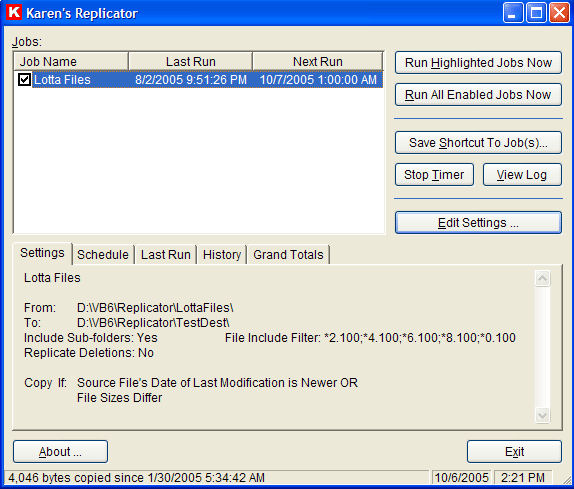
I have tried many backup programs, because lets face it, if it's not easy it ain't gonna happen. Of all the programs I have tried (some free, some not) the one I like the best (and use daily) is a free program call "Replicator" from KarenWare.com (Karen has a bunch of free programs that she offers on her website, so be sure to check it out).

Replicator has some way cool futures and is completely customizable, it will automatically backup files, directories, or and entire drives. It will copy selected files from one drive/folder to another on a schedule of your choosing. You can copy only files that have changed or all files regardless of the change status, and if you have deleted a file from the source drive, it will (if you so desire) delete the same file from your backup drive/folder. Other options include repeated backups/copies at intervals as short as a minute, or as far apart as several months.

The source and destination folders can be anywhere on your network and some of the newer features allow you to specify which files should not be copied, and also which days a given file should be skipped.

Now, where to back your files up, Staples (one of my all-time favorite places - if they combined Borders and Staples into one store I would buy a condo there, but I digress), Staples has several external USB hard drives on sale right now, a 500 GB Western Digital for $129 and a 160 GB Mini Maxtor for for $109.

And these sale prices run through December 8th, and even if you are reading this blog entry after the 8th Staples frequently (as in almost once a month) has external hard drives on sale.

Seriously, close your eyes and think about it, what you would do if your hard drive fried and took all your digital images with it?
If that isn't enough to make you wish you were wearing an adult diaper, I don't know what would.
So go setup your backups right now, your images are begging you.

A website you must visit!...

Today I visited Lighting Essentials, and if you are interested in learning more about lighting (and in the process improve your photography) you have to go there too, do not pass go, do not collect $200.

The website (and the wealth of information contained there in) is maintained by Don Giannatti and he will wow you with his knowledge and his mages.

When you go, be sure to visit his "Setups" page, here Don will not only give you videos of his shoot, he also includes graphic layouts, F-Stop settings, surrounding buildings, sun direction, and much more. One of the things I greatly appreciated is that you can download the videos for viewing at times that are convenient to you and when you may not have access to the internet.

Stop by, be wowed, and become a better photographer.


Christmas is right around the corner...

And there are two things I wanted to share with you.

1. Xerox is sponsoring a website Let's say Thanks, were you can send a free card to military personnel station overseas. It could not be easier, you pick a card, personalize the message, and hit "send". Done. Xerox will then print out the cards and mail them. All free. All for a very good cause. So be sure to visit Let's say Thanks and send a soldier a card.

2. Toy safety is a big issue, and I would be hard pressed in finding anyone who was not buying a toy for a child, be it their own or the child of another. All the recalls have certainly not made shopping any easier, but U.S. PIRG has. U.S. PIRG is a clearing house of information on toy recalls and toy safety, so if you want to take a little of the worry out of what you bought (or will buy) stop by their site and find out what is safe and what is not.

If you have any links that will make Christmas happier and/or safer for another, please don't keep them to yourself, share them with us.

Please Excuse my Absence…

I have been away visiting family in the Raleigh North Carolina area for the week of Thanksgiving, but am back and will start catching up on my posting.

Here are some shots I took while I was there:

These first two shots are from a church built almost 200 years ago, there was a young man who wanted to marry his love and bring her back to his remote Raleigh farm, but her father would not give his blessing as there was no church "way out there". So the young groom did want any man in love would do, he built a church!


This shot is the door of a tobacco drying shed.


While driving the back roads, looking for photo ops, I came across this dead tree. I used an infra red filter in Lightroom.

ExpoDisc Kicks Butt!...

The good folks over at ExpoImaging were kind enough to send me an ExpoDisc to test drive, and as Gomer Pyle would say "Golly"! And for those who don't know who Gomer Pyle is, I have just severely dated myself. You will find Gomer here.

Back to the ExpoDisc, it could not be easier to use and the results could not be better.

As photographers there are things we strive for, getting it right in camera is one, and saving time when it comes to processing images is another.

First, getting it right in camera. When shooting a wedding, I can be in many different lighting scenarios in a very short period of time, with the bride as she gets ready, in the church, outside the church, at the reception, and outside the reception. Using the auto white balance option may seem like the easy way out and yes it will work some of the time, but there are also times when it looks as if the white balance wes set by Stevie Wonder. If you don't get it right in camera, then you then have to get it right in post production, and if you just shoot 2000 images (or more) at a wedding that you need to "get right", it is going to be a very looooong day.

ExpoDisc to the rescue, it's quick, it's easy, and it gets it right. In under a minute you can set a custom white balance matched specifically to the light you are in at that very moment. I do mean in less than a minute, here is the tutorial from the ExpoImaging website, get your camera and try it for yourself. The tutorials are camera manufacturer and model specific, so they could not have made it easier.

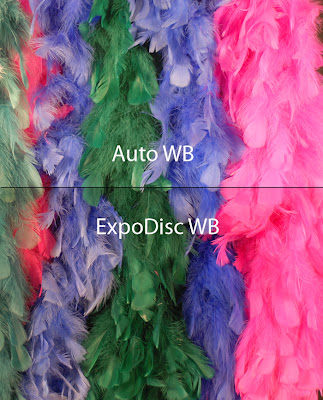
Here are a couple of my test images, first I shot with an auto white balance setting, I then used the ExpoDisc to do a custom white balance.

This first is an image of a bunch of different colored boas shot in my studio under lights. Please don't ask why I have so many, suffice it to say there are some days when I just feel pretty.

The second shot was taken on my sun porch with all natural light (also known as the "sun"). Yes, my house is really that yellow.
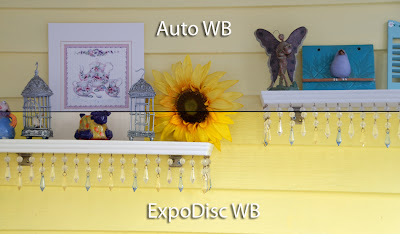
See a difference?

;)

The ExpoDisc runs from $79 to $119 depending on your lens size and in my humble opinion this is a small price to pay to get the shot "right". Ask yourself, how much is your time worth? How much is "the shot" worth to your client? Start adding up all the different ways and I am willing to bet it is waaaaay more than $79.

I thought so, now get get yourself an ExpoDisc.

Here is a blog you will want to check out...

For most of us the goal is to sell our images and/or our photographic services.

Photopreneur is a great place to learn new ways to market yourself and new places to do it.
Here is a sampling of just some of the articles:

Get Your Photos Hung in Homes and Hotels

47 Things People Will Pay You to Shoot

How to Market Your Photography

52 ways to Monetize Your Photos

The Most Effective Ways to Get Eyes on Your Images

5 Ways to Earn Money Flickr

If Photopreneur gives you just one good idea on how to improve your business model (aka your bottom line) then it will have been time very well spent, so go take a look and be sure to share Photopreneur with your photo buddies.

And before I start getting hoity toity emails that "it's not about the money, it's about the art", let me pass along something I heard Vincent Versace say during in interview "amateurs think in terms of art, an artist thinks in terms of money".

'Nough Said.

Product Review - LumiQuest Ultra Image...

LumiQuest has put together a very nice set of actions for Photoshop called Ultra Image.

These are more than just a bunch of actions, but sets of actions that have been together by professional photographer Mike White. These are also camera specific actions that will make your images look better by adjusting noise, color, sharpness and tone range.

The reason they are camera specific is that the image processing (such as sharpening) is done based on the expected image size for a given camera.

What makes these action sets somewhat unique is that you will choose them less because of what they do, and more because of what the image is, like a portrait, sports, landscape, wedding, etc., and each action set is based on what a photographer would normally/likely do to a wedding or landscape picture.

Now I could (continue to) ramble on about what Ultra Image does but as they say - a picture is worth a thousand words - so here are two crappy images (and I will deny that I ever took them!) and it is obvious how much Ultra Image has improved each of them.

Pretty significant improvement, huh?

Should you want to apply the same action set to a bunch of images, batch processing is a snap.

My hope is that they will make a set of presets (similar to these actions) for Lightroom, I have CS3 and love what Photoshop can do, but Lightroom is not only my favorite piece of software, it is the tool that is my workflow work horse!

Come back next time and you will get my review of the ExpoDisk!

Could you use $5,000 or $10,000... Photo Contests...

The following is a list of photo contests for both professional and amateur photographers, some have prizes, some don't, and some that don't even require you to submit a picture.

1. Peachpit Press is having a "$1,000 Question" contest, what would you recommend to a person just starting in digital photography and they had a $1,000 starting budget.

2. The Pilsner Urquell International Photography Awards has an annual Professional ($10,000 prize) and Amateur ($5,000 prize) photography contest. Now that would pay for a memory card or two.

3. National Geographic has a monthly competition, though there is no cash prize, if you win your photo will be published on their website, a pretty darn good prize of you ask me. National Geographic has other photo contests throughout the year, some with cash prizes, but none goiing one as of this writing.

4. Shutterbug magazine has a listing of several contests that are available to both the professional and amateur photographers.

5. BetterPhoto.com has a monthly photo contests in different catagories, and though the prizes are minimal, the prestige of winning is not.

6. PDOnline.com has three different contests going on right now, including one that is specifically for pictures taken from cell phones.

7. The College Photography Contest has over $4,000 cash and two Nikon cameras to giveaway, but this contest ends November 19th so you'll need to move.

The next 2 weeks are going to have some way cool entries, including reviews of an ExpoDisk and a Lumiquest Big Bounce diffuser, so be sure to bookmark and/or subscribe to this blog.

Good luck!