A DIY tilt-shift lens mount for Nikon cameras...
I love DIY projects, whether its photography, home, or anything else. You get the satisfaction of doing it with your own two hands AND the finished project usually is at a significant savings.
I also love the images produced by a tilt-shift lenses, so this post is a perfect combination of the two.
Today we have a DIY tilt-shift lens mount for Nikon cameras, you will need a 3D printer but not to fret, if you don't have access to one locally (heck, even little old Biddeford Maine has local 3D printing resources), there are plenty of online resources that are both inexpensive AND fast (check out 3D rapid Print, Print to 3D, Ponoko, or Sculpteo).
There are just 6 (small) parts that need to be printed and assembled, Instructable user Cpt. Insano has been kind enough to not only lay out the entire project step by step, you can even download the files needed to be used with the 3D printer to produce the parts!
So follow this link over to Instructable and start on your DIY tilt-shift mount today.
If you have (or know of) a cool DIY photography project please email us and let us know so we can share it with the group.
Call for contributors to Weekly Photo Tips!...
Would you like to write a guest blog post for Weekly Photo Tips?
Well, it just so happens we are currently looking for contributors, so if you have a tip, a trick, a technique, a tutorial, or (almost) any photography related idea you would like to share with our readers we would love to know about it.
Any post that is chosen to appear here on Weekly Photo Tips will do so under your name with your bio and link(s) back to your website, blog, or other web presence.
So please, send us an email with your idea and we promise to get right back to you.
Welcome to another Flicker Friday!...
This week we have images from "across the pond", by photographer Edward Dullard.
Please check out more of these stunning images over at Edward's Flickr stream or visit him at 500px.com.
Click on any of images to view larger.
More great resources on shooting shiny, reflective objects...
This to follow up on our post from earlier today, "Photographing shiny, reflective objects, quick & easy".
Below are more great resources on shooting shiny, reflective objects.

One of the more challenging things to light is glass (and other highly reflective surfaces), because normally when we photograph a subject we are putting our light on that subject. But with glass we do the opposite, we are lighting around the subject.
I have put together some incredible examples of how to light reflective surfaces, so hang on, here goes:
The first resource (of course) is from David Hobby (aka Strobist), it was an assignment he shot of flavored vodkas, so follow this link to see all the shiny details.
Resource number two is from Strobist as well (seeing a theme here?), and it too involves alcohol (theme number two), this time it's beer, check it out.
This link is from DIY Photography (more beer).
Here are the last two well done tutorials for lighting glass here and here (sorry, no alcohol in these).
We will close with a video tutorial on how to shoot glass.
Subscribers, you know the routine, you will need to return to the blog to watch the video (as it does not get pushed through with your subscription).
Photographing shiny, reflective objects, quick & easy...

We recently traveled to Connecticut to shoot shiny and reflective components for the world leader in CAD/CAM software MasterCAM .
Not only is MasterCAM a world leader, they work with some of the top companies out there, like:
• Boeing, Sikorsky, and Lockheed Martin
• Stryker medical
• Gibson, Taylor, Ovation Guitars
• Orange County Choppers
• Racing teams like Stewart Haas Racing, Waltrip Racing, and Cunningham Motorsports
• Segway
• RayBan
Just to name a few.
The actual purpose of the trip was to teach their person (with the title of "Intergalactic Marketing Overlord") how to shoot the kind of components their software (and clients) produce and of course regardless of the company, they are ALL shiny and reflective. The backup plan was that if things did not go well then I would shoot the parts.
Things went perfectly and the setup could not have been simpler, 4 "A" clamps, 3 white cards, 2 LED flashlights, foam core, some tape, light stands, and a couple gels.
We used hockey tape because it is FAR less expensive the gaffers tape, but much like gaffers tape it is incredibly strong and leaves no sticky residue behind.
A 1” wide role of gaffer’s tapes is in the $12 range, I bought the same size hockey tape for $1.
I would strongly suggest you test the tape you purchase before using it in a “live” shoot just to make sure it will work as you expect and not leave residue.
The "A" clamps were 99 cents (Home Depot or Lowes) and the 2'x3' sheet of foam core was $1.
In the shot at the very top of this post, we lit it with a single LED flashlight, and put a blue gel over a second flashlight and shined it into the center hole (to give it more "depth")
One of the things you need to be very careful to watch for is things being reflected in the item being shot, here is an example, first the "good shot" and then the bad, you can see the color of my shirt in the item.
It was lit with a "primary" flashlight and a second with a blue gel.


This image is the only one that we used more than two flashlights, it is a manifold for a car engine, there is a (cold) gas intake and a (hot) exhaust port, so we used a red and blue gels over the flashlights and held them over the ports to represent the temperature difference and the third flashlight was used to light the face of the object.

Here are a few more images we shot that day.


I think the results were as good as the setup was easy and in the video below we share both the gear and the setup.
If the video did not come through with your subscription email you can head back to the blog or directly over to our YouTube channel to view it.
More Lightroom resources for you, this time it's free Lightroom training...
This is to "compliment" our Lightroom posts from last week, the first being where to download your "Free Lightroom Quick Start Guide" and the other was the bazzilion "Free Lightroom Presets" post.
If you are looking for Lightroom video training, this is the list for you:
1. Let's start with Anthony Morganti, he has put together an amazing 38 video series on using Lightroom
2. Shutha is a free online training resource and one of their courses is an extremely comprehensive exploration of Adobe Photoshop Lightroom taught by Lightroom expert Peter Krogh
3. Then there is 100 Ways Adobe Lightroom Kicks Adobe Bridge's A$$ for Photographers! from Scott Kelby
4. No list would be complete without having the long running Lightroom Killer Tips from Matt Kloskowski
5. B&H Photo has a 4 video series "Digital Photography Summit" filled with almost 4 hours of Lightroom training
This is proof you can get really good stuff for free.
Welcome to our first Flickr Friday...
For our first ever Flickr Friday please enjoy the images of Maryann.
Please stop by our Flickr Group to see other great images from Maryann and our other members as well.
If you would like to join our Flickr Group just follow this link for instructions.
Get your free Lightroom 5 quick start guide...
Lightroom expert Victoria Bampton aka "The Lightroom Queen" has put together an outstanding (and FREE) Lightroom PDF "Lightroom 5 Quick Start Guide".
It's 78 pages and packed with useful information from front to back, so follow this link to get your copy.
But wait, there's more!
Victoria also has a bunch of other great FREE resources as well, including Lightroom Plug-ins, Lightroom Keyboard shortcuts, and downloadable watermarks.
While we're talking about Lightroom, here are a couple more resources you will want to use.
From Adobe here is their Lightroom 5 getting started and a complete list of their Lightroom 5 tutorials.
More FREE Lightroom presets than you can count!...
Updated and Expanded!
Today's post is an updated and expanded version of one of our most popular posts EVER, all you'll find here today are free Adobe Lightroom presets, but contrary to what the title of the post says, you most likely would be able to count how many presets are listed here, which likely approaches one thousand.
This post goes well with our post on Lightroom educational resources from last week, so once you finished all the tutorials you can get to work using some of these free presets.
There's a lot, so lets get at it:
1. From f/stop spot - Free Lightroom Workflow Presets for Portrait Photographers
2. Here are free Lightroom presets from Adobe
3. Fine art photographer Andrew S. Gibson - Using Lightroom Presets for Portraits
4. Presets Heaven - TOP 5 most downloaded Lightroom Presets
5. Nicole S. Young (one of my favorite people) - Free Lightroom Presets
6. Matt Kloskowski (another of my favorites) - Lightroom Presets – Wedding Fairytale Glow
7. Matt Kloskowski II - You'll find all of his free presets here
8. You have just one guess at what you'll find at FreePresets.com
9. Tonja Petrella has put together an extensive list of free and almost free presets on Pinterest
10. Free Lightroom Presets for weddings from Dror Eyal
11. Here's a list of presets, tutorials, and more from Digital Photo Buzz
12. Gavin Seim - The Ultimate Free Presets List (pretty darn extensive)
13. A big pack of free Lightroom presets from William
14. Lightroom Presets from onOne Software
15. photo tut+ - 100 Free Lightroom Presets (And How to Make Your Own)
16. 14 free presets from Wonderland Adobe Lightroom Presets
17. Inside Lightroom - Black & White presets (be sure to click on all the categories under "Lightroom Presets" so see all of the free presets available)
18. Another Pinterest list of Free Lightroom Presets from Genevieve Winters
19. Check out Presetting Lightroom's 180+ Free Presets Collection
20. PresetPond has many, MANY presets and I like that you can mouse over the image to see the preset "in action"
21. Cole's Classroom brings you "15 Must Have Lightroom Presets!"
22. Be sure to check out Anthony Morganti's "More Free Lightroom Presets"
23. Here you will find "230 Free Lightroom Presets You Will Love"
24. If you like black & white head over to FlixelPix for their free lightroom presets
25. coincidentally, at #25 is 25 Excellent Free Adobe Lightroom Presets
26. Katherine M. has assembled a very nice collection of presets on her Pinterest board
Please feel free to share this post with all your Lightroom using friends!
If you know of free presets that are not listed here let us know by dropping us an email and we will be sure to update our list.
A new Weekly Photo Tips feature - "Flickr Friday"...

Beginning this Friday (6/6/14) we will be starting a new feature Weekly Photo Tips called, "Flickr Friday".
Each Friday we will pick images from our Flickr group for you (and the world) to see.
So if you are already a member of our Flickr group please upload your images, if you are not yet a member but would like to be, here's how:
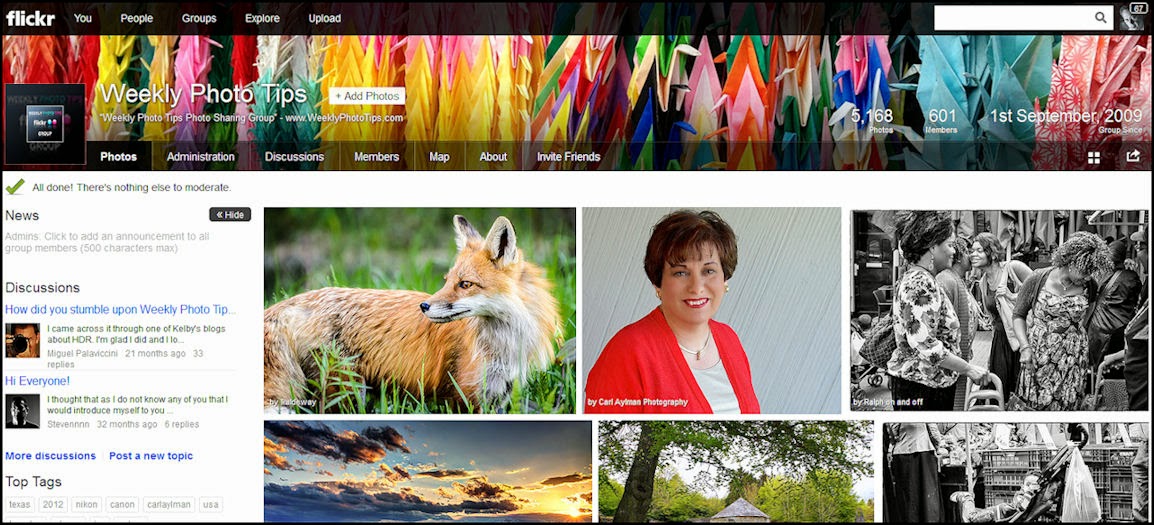
The first thing you will do is follow this link to our Flickr page. Once there, in the upper left page heading you will see a "+ Join Group" box that you will click on to join our group (see the screen shot below). To join the group you will need a Flickr account, if you don't have a Flickr account you will need to create one.
Once your request to join our group is approved (which will usually only take a few hours) you can return to our Flickr page and submit all images you would like.
As a member, when you return to our Flickr page you will find the "+ Add Photos" box in the exact same place that the "+ Join Group" was. (see the screenshot below).
The only thing we ask is that any images you upload to our group be "family friendly".
For easier viewing simply click on an image to view it larger and in a new window.
I hope that helps, if you still have questions do not hesitate to contact us and we will do what we can to get you up and running.
Check out the Photoflex Litedome Platinum Softbox...
My Photoflex softbox is by far one of my favorite lighting tools, and of all the gear I own, it is the one borrowed the most by my photography friends.
Right now not only does Adorama have the Photoflex Litedome Platinum Softbox on sale ($127), it also comes with a free grid (a $99 value), AND free shipping!
It durable, portable, comes with a 6 year warranty and the following features:
- Removable Face - adjust the natural, soft light to create just the right diffusion
- Removable Baffle - helps eliminate hotspots
- White interior panels
- Quick Release Corners - creates stronger corners and makes it easier to break down
- Suspension loops - suspends the light without Boom/Boom Stand
- Carry Bag - included for easy storage and transport
- Free grid - attaches to the face for better control and create different lighting effects
Below is our video review/demo of the Photoflex LiteDome ES, it is also on sale (with free shipping) and comes with Speedlight/Speedlite mounting hardware (with two cold shoe mounts, one for your flash and the other for the trigger), along with a light stand bracket (which also works nicely as a handheld device) and carry bag.
The Photoflex LiteDome ES is compact and so portable that it will fit in most large camera bags.
(For subscribers the video does not "push" through and you'll need to return to the blog to view the video, or you can head directly to our YouTube channel)
Your photo could be worth $15,000!...
Yup, $15,000, that's the top prize and there are multiple prizes under that as well.
The Weather Channel is in the midst of a photo contest, open to everyone (meaning amateur AND professional photographers)
They are looking for images that "showcase the passion of mother nature and capture the beauty and power she posses".
You have until June 15th (2014) to submit your entry.
Important social media reference links...
To follow up on yesterdays post on "Online Marketing Resources", we bring you a post from social media expert Andrea Vahl, who has gathered a lot of reference links for each and every social site that most of us use all the time.
So if you want the links to get the latest news, contact info, help email links (and more) to Twitter, Facebook, Google+, Pinterest and the rest of the social media "players" just follow this link to the great resource put together by Andrea.
Lexar Pro SDHC & CompactFlash memory cards are on sale!...
These are the memory cards I use (and love), not only are they on sale for incredibly low prices, they all come with free shipping as well!
Lexar 32GB Professional SDHC UHS-I 600x Class 10 Memory Card, 45MB/s Write Speed $16.95
Lexar 64GB Professional 600x SDXC UHS-I Class 10 Memory Card, 90MB/s guaranteed read transfer speed $42.95
Lexar 128GB Professional 600x SDXC UHS-I Class 10 Memory Card 90MB/s guaranteed read transfer speed $93.95
Lexar 16GB Professional 1066x CompactFlash Memory Card 160MB/s read transfer speed $48.95
Lexar 64GB Professional 1066x CompactFlash Memory Card 160MB/s read transfer speed $88.95
Lexar 16GB Professional 1066x CompactFlash Memory Card - Pack Of Two - 160MB/s read transfer speed $91.95
Lexar 32GB Professional 1066x CompactFlash Memory Card 160MB/s read transfer speed $63.95
Lexar 16GB Professional 800x CompactFlash Card 120MB minimum guaranteed sustained read speed $42.95
Lexar 64GB Professional 800x CompactFlash Card - 2 Pack - 120MB/s minimum guaranteed sustained read speed $184.95
Subscribe to:
Posts (Atom)