This one is important, REALLY IMPORTANT!...

I was reading one of my many photography magazines yesterday and there was an article on backing up your images, and the point was driven home with real world examples of what happens to folks when they don't perform regular backups and then suffer some sort of catastrophic hardware failure.

It makes me whimper just thinking about it.

This is not bragging (really), but I can honestly say that I perform backups on a daily basis AND do so to multiple hard drives, which does not make me better, just more anal.

;)

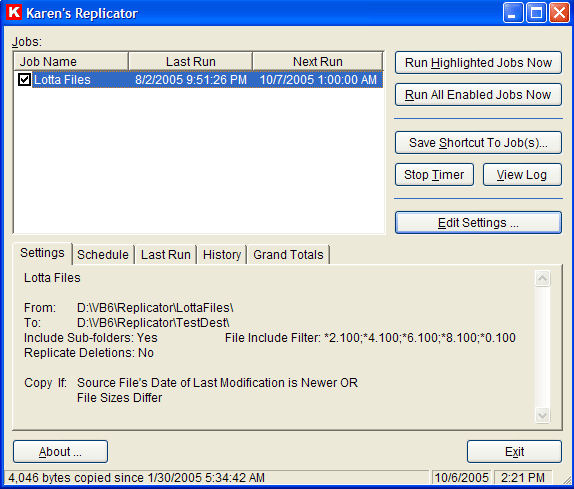
I have tried many backup programs, because lets face it, if it's not easy it ain't gonna happen. Of all the programs I have tried (some free, some not) the one I like the best (and use daily) is a free program call "Replicator" from KarenWare.com (Karen has a bunch of free programs that she offers on her website, so be sure to check it out).

Replicator has some way cool futures and is completely customizable, it will automatically backup files, directories, or and entire drives. It will copy selected files from one drive/folder to another on a schedule of your choosing. You can copy only files that have changed or all files regardless of the change status, and if you have deleted a file from the source drive, it will (if you so desire) delete the same file from your backup drive/folder. Other options include repeated backups/copies at intervals as short as a minute, or as far apart as several months.

The source and destination folders can be anywhere on your network and some of the newer features allow you to specify which files should not be copied, and also which days a given file should be skipped.
Now, where to back your files up, Staples (one of my all-time favorite places - if they combined Borders and Staples into one store I would buy a condo there, but I digress), Staples has several external USB hard drives on sale right now, a 500 GB Western Digital for $129 and a 160 GB Mini Maxtor for for $109.

And these sale prices run through December 8th, and even if you are reading this blog entry after the 8th Staples frequently (as in almost once a month) has external hard drives on sale.

Seriously, close your eyes and think about it, what you would do if your hard drive fried and took all your digital images with it?
If that isn't enough to make you wish you were wearing an adult diaper, I don't know what would.
So go setup your backups right now, your images are begging you.

A website you must visit!...

Today I visited Lighting Essentials, and if you are interested in learning more about lighting (and in the process improve your photography) you have to go there too, do not pass go, do not collect $200.

The website (and the wealth of information contained there in) is maintained by Don Giannatti and he will wow you with his knowledge and his mages.

When you go, be sure to visit his "Setups" page, here Don will not only give you videos of his shoot, he also includes graphic layouts, F-Stop settings, surrounding buildings, sun direction, and much more. One of the things I greatly appreciated is that you can download the videos for viewing at times that are convenient to you and when you may not have access to the internet.

Stop by, be wowed, and become a better photographer.


Christmas is right around the corner...

And there are two things I wanted to share with you.

1. Xerox is sponsoring a website Let's say Thanks, were you can send a free card to military personnel station overseas. It could not be easier, you pick a card, personalize the message, and hit "send". Done. Xerox will then print out the cards and mail them. All free. All for a very good cause. So be sure to visit Let's say Thanks and send a soldier a card.

2. Toy safety is a big issue, and I would be hard pressed in finding anyone who was not buying a toy for a child, be it their own or the child of another. All the recalls have certainly not made shopping any easier, but U.S. PIRG has. U.S. PIRG is a clearing house of information on toy recalls and toy safety, so if you want to take a little of the worry out of what you bought (or will buy) stop by their site and find out what is safe and what is not.

If you have any links that will make Christmas happier and/or safer for another, please don't keep them to yourself, share them with us.

Please Excuse my Absence…

I have been away visiting family in the Raleigh North Carolina area for the week of Thanksgiving, but am back and will start catching up on my posting.

Here are some shots I took while I was there:

These first two shots are from a church built almost 200 years ago, there was a young man who wanted to marry his love and bring her back to his remote Raleigh farm, but her father would not give his blessing as there was no church "way out there". So the young groom did want any man in love would do, he built a church!


This shot is the door of a tobacco drying shed.


While driving the back roads, looking for photo ops, I came across this dead tree. I used an infra red filter in Lightroom.

ExpoDisc Kicks Butt!...

The good folks over at ExpoImaging were kind enough to send me an ExpoDisc to test drive, and as Gomer Pyle would say "Golly"! And for those who don't know who Gomer Pyle is, I have just severely dated myself. You will find Gomer here.

Back to the ExpoDisc, it could not be easier to use and the results could not be better.

As photographers there are things we strive for, getting it right in camera is one, and saving time when it comes to processing images is another.

First, getting it right in camera. When shooting a wedding, I can be in many different lighting scenarios in a very short period of time, with the bride as she gets ready, in the church, outside the church, at the reception, and outside the reception. Using the auto white balance option may seem like the easy way out and yes it will work some of the time, but there are also times when it looks as if the white balance wes set by Stevie Wonder. If you don't get it right in camera, then you then have to get it right in post production, and if you just shoot 2000 images (or more) at a wedding that you need to "get right", it is going to be a very looooong day.

ExpoDisc to the rescue, it's quick, it's easy, and it gets it right. In under a minute you can set a custom white balance matched specifically to the light you are in at that very moment. I do mean in less than a minute, here is the tutorial from the ExpoImaging website, get your camera and try it for yourself. The tutorials are camera manufacturer and model specific, so they could not have made it easier.

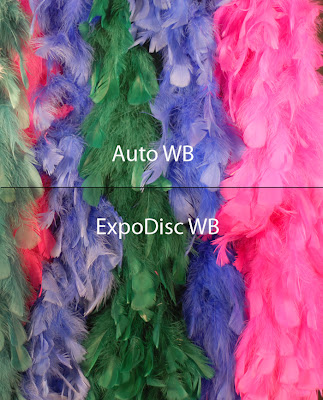
Here are a couple of my test images, first I shot with an auto white balance setting, I then used the ExpoDisc to do a custom white balance.

This first is an image of a bunch of different colored boas shot in my studio under lights. Please don't ask why I have so many, suffice it to say there are some days when I just feel pretty.

The second shot was taken on my sun porch with all natural light (also known as the "sun"). Yes, my house is really that yellow.
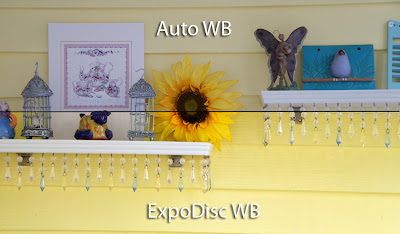
See a difference?

;)

The ExpoDisc runs from $79 to $119 depending on your lens size and in my humble opinion this is a small price to pay to get the shot "right". Ask yourself, how much is your time worth? How much is "the shot" worth to your client? Start adding up all the different ways and I am willing to bet it is waaaaay more than $79.

I thought so, now get get yourself an ExpoDisc.

Here is a blog you will want to check out...

For most of us the goal is to sell our images and/or our photographic services.

Photopreneur is a great place to learn new ways to market yourself and new places to do it.
Here is a sampling of just some of the articles:

Get Your Photos Hung in Homes and Hotels

47 Things People Will Pay You to Shoot

How to Market Your Photography

52 ways to Monetize Your Photos

The Most Effective Ways to Get Eyes on Your Images

5 Ways to Earn Money Flickr

If Photopreneur gives you just one good idea on how to improve your business model (aka your bottom line) then it will have been time very well spent, so go take a look and be sure to share Photopreneur with your photo buddies.

And before I start getting hoity toity emails that "it's not about the money, it's about the art", let me pass along something I heard Vincent Versace say during in interview "amateurs think in terms of art, an artist thinks in terms of money".

'Nough Said.

Product Review - LumiQuest Ultra Image...

LumiQuest has put together a very nice set of actions for Photoshop called Ultra Image.

These are more than just a bunch of actions, but sets of actions that have been together by professional photographer Mike White. These are also camera specific actions that will make your images look better by adjusting noise, color, sharpness and tone range.

The reason they are camera specific is that the image processing (such as sharpening) is done based on the expected image size for a given camera.

What makes these action sets somewhat unique is that you will choose them less because of what they do, and more because of what the image is, like a portrait, sports, landscape, wedding, etc., and each action set is based on what a photographer would normally/likely do to a wedding or landscape picture.

Now I could (continue to) ramble on about what Ultra Image does but as they say - a picture is worth a thousand words - so here are two crappy images (and I will deny that I ever took them!) and it is obvious how much Ultra Image has improved each of them.

Pretty significant improvement, huh?

Should you want to apply the same action set to a bunch of images, batch processing is a snap.

My hope is that they will make a set of presets (similar to these actions) for Lightroom, I have CS3 and love what Photoshop can do, but Lightroom is not only my favorite piece of software, it is the tool that is my workflow work horse!

Come back next time and you will get my review of the ExpoDisk!

Could you use $5,000 or $10,000... Photo Contests...

The following is a list of photo contests for both professional and amateur photographers, some have prizes, some don't, and some that don't even require you to submit a picture.

1. Peachpit Press is having a "$1,000 Question" contest, what would you recommend to a person just starting in digital photography and they had a $1,000 starting budget.

2. The Pilsner Urquell International Photography Awards has an annual Professional ($10,000 prize) and Amateur ($5,000 prize) photography contest. Now that would pay for a memory card or two.

3. National Geographic has a monthly competition, though there is no cash prize, if you win your photo will be published on their website, a pretty darn good prize of you ask me. National Geographic has other photo contests throughout the year, some with cash prizes, but none goiing one as of this writing.

4. Shutterbug magazine has a listing of several contests that are available to both the professional and amateur photographers.

5. BetterPhoto.com has a monthly photo contests in different catagories, and though the prizes are minimal, the prestige of winning is not.

6. PDOnline.com has three different contests going on right now, including one that is specifically for pictures taken from cell phones.

7. The College Photography Contest has over $4,000 cash and two Nikon cameras to giveaway, but this contest ends November 19th so you'll need to move.

The next 2 weeks are going to have some way cool entries, including reviews of an ExpoDisk and a Lumiquest Big Bounce diffuser, so be sure to bookmark and/or subscribe to this blog.

Good luck!

The work of which I am most proud... again...

Robert N. Dechene, 23 / Army – Tour of duty 7/16/67 – 9/17/67

Raymond A. Borduas, 20 / Marine – tour of duty 5/5/68 – 6/4/68

This story was originally posted when I first started this blog, and because of the significance of the work (to me) and the dramatic increase on folks visiting this blog I wanted to dust it off for more people to see.

Of all the work (photographically) I have done, these two images are what I am most proud of. Though they may have little to do necessarily with photographic skills, the families (and fellow veterans) think them to be wonderful “pictures”.

I was a green beret during Vietnam, so the fact that seven boys (literally, boys) from this small town in southern Maine where I live did not come home is of significance to the people who live here.

After more than 30 years (and for the first time) I finally visited the Vietnam War Memorial. While there I took a picture of the panels that have the names of these two of young men inscribed on them.

Here is a (very abbreviated) overview of what I did In Photoshop:

1. Burnt all but their names so they were pushed to the background but still viewable
2. Painted their names white to make them stand out
3. Took one of their old pictures and converted it to digital
4. Combined their old photo with the photo of the wall that bore their name

It was difficult at times working on these images, having these young men literally “looking” back at me… and at one point the Pink Floyd song “Wish You Were Here” came on the radio… I will save you the details; suffice it to say I was glad no one else was at home.

Then it came time to give them to the families. Roberts family had been told something was going to be delivered to them, all of the family and friends in the area had gathered at the house and were waiting… after they passed the picture around several times and looked at it for awhile, they all climbed in their cars and headed to the nursing home where his mom now resides, so she could see it.

Rays family was equally as grateful; his brother has been to my studio more than once to thank me.

I did not do these for praise or recognition, but because these boys deserve to be remembered and I wanted to do my part to make sure that happens.

Photography and the law...

I recently listened to a podcast that really opened my eyes and made me think (is that a double cliché?), it had to do with all the things I thought I knew about photography and the law.

Episode #71 if The Digital Photography Show has an interview with Carolyn Wright and she covers the ten misconceptions of the law for photographers. What makes her an authority in this area is that she is a professional photographer, she is an attorney, and she has a law practice that focuses on law that impacts photographers. The content covered is done in an informative, interesting, and easy to understand way.

Here is just a taste of what is covered in this interview: Do you need permission to photograph a work of art in a public area? If you make money off a piece, is it automatically a commercial work? Can you put someone’s picture on your book cover without a model release?

This interview is a must listen.

Once you finish the podcast, do what I did and head directly to Carolyn’s blog "PhotoAttorney". At the PhotoAttorney blog you will find even more timely and pertinent information about photography and the law. Be sure to book mark PhotoAttorney and go back frequently as there are new entries are every 2-3 days and you do not want to miss a single one.


Carolyn has also written a book "The Photographers Legal Guide" and she was kind enough to send me a copy for review. Now normally reading a law book presents me with a difficult decision, reading the book or poking myself in the eye with a stick.... book, stick in the eye... being fond of my eyes, I read the book.

Once I read the following, I could not put the book down, I needed to know what else Carolyn had to say:

"Photographers have certain rights but often are concerned about exercising those rights for fear of being sued. It’s a legitimate concern because lawsuits can be costly and stressful, even when you win. The counter-concern is that if photographers don’t exercise their rights, they may lose them.

Take, for example, the property release. The law does not require permission to take and use a photograph of property, so no release is required. Most photographers understand that you may stand on publicly accessible land to take a photograph of a building without a release. But some photographers and users of photographs (such as stock agencies) will want a property release to use the photograph of that building to allay concerns of being sued. Some may require one only if the photograph is used commercially. Will it hurt to get one? Not in the short run, but there may be a long term negative effect.

If the building’s owner signs the property release, then you have little concern that he will sue you for the use of the photo (but it is still a possibility). But what if he refuses to sign? Then you will have to find another building to photograph and ask for permission again. What if he demands payment? You then must pay for something that you are entitled to have for free.

If the building owner signs the release, he will expect the next photographer to ask for a property release, too. If permission is not requested, will the owner sue the second photographer for doing something within his rights? Will all photog­raphers then have to get permission or pay for something when it is not legally required?

What other photographers’ rights will erode from fear of exercising them? The first step towards protecting your rights is to know them. The second is to stand up for them."

Every bit of the book is this insightful, this thought provoking, this well written. Still think you have enough of a handle on the legalities of photography - that you "don't need no stinkin' advice"? Unless you can answer ALL of the following questions correctly and with confidence, you need this book.

·When is an image considered to be copyright written?

·Can you assign, sell, transfer or give away any part of your images “exclusive rights” verbally?

·what is the difference between “Copyrighting” and “Registering”?

·can you photograph people are in public?

·Can you take a picture of the best looking house in your town and use it on your business card?

·Does Posting Photos on your website constitute publishing them?

·When you registering your website, does this protect your images as well?

·Do you know what forms you need, where to get them, and how to fill them out?

·what is the best way to protect your copyrights and prosecuting infringe?

·Retainer or Deposit, which do you use and why?

Bottom line, this book is filled with examples of real world situations that could confront any photographer and explains in clear, concise terms how they impact the photographer, and what we must do to protect ourselves..

You can purchase "The Photographers Legal Guide" here for just $9.95 as a download or $19.95 for the printed version and though it will be the least expensive thing you buy for your photography business, it will be by far the most important. You can easily recover from making a bad decision in a lens or other piece of camera equipment, but if you make the wrong legal decision it could cost you far more than you want to lose.

I do have one aspect of the book that I was extremely disappointed with, though it has a handful of the authors images, it did not have nearly enough of them. As the above picture demonstrates, Carolyn is wonderful photographer and I wish the book had a chapter of nothing but her images.

Finally, I know some of you may read this post and think it sounds like a butt kissing love fest, I do not know Carolyn Wright, we have never met, never even talked, and be assured I won't receive a penny from the sale of a single book. I think this is an extremely important topic and have always been a firm believer that it is better to act than to wait for something bad to happen and then react.

The Photographers Legal Guide is your chance to be proactive.

Some cool free software and David Ziser…

First let me give credit where credit is due, I learned of these from David Ziser, he uses these two pieces of software as part of his workflow and if one of the most talented and successful photography studios uses them, why wouldn't I?

The first is IrfanView, a fast and compact image viewer/converter. IrfanView lets you open, view, and edit images, rotate, zoom and so much more. You can also cut, crop images, and apply batch conversions.

What I really like about IrfanView is the ability to copy/move images quickly and easily to different folders. How it works is simple, as you browse through a folder of newly downloaded images for the very first time with a singe keyboard command (F7 to Move or F8 to Copy), you can select from one of ten (customizable) folders to drop images into for later processing.

Another cool feature is the ability to convert an image to grayscale with a single click (not permanently, just to see what it would look like), this is helpful in the sorting process as well, as one of the folders I sort to is specifically for black and white conversion.

Want to batch convert an entire folder to black and white or sepia? IrfanView can do that too.

Lastly (not that this is the last thing it con do, just the last thing I am going to mention) should you be so moved, and again with a single click, you can open any image into the image editing software of your choosing, in the customizable settings you can setup up to three separate external programs to be used for opening an image.

This is an impressively powerful piece of software and there is really so much more you can do with this, what I have mentioned does not even scratch the surface and I would strongly suggest you give IrfanView a try.

The second is Batch Rename .EXE.

Batch Rename .EXE allows you to run your files through an extensive array of filters to label and organize files exactly how you want them. You can add information, remove information, change capitalization and more.

The selection wizard walks you through creating file lists for batch processing and allows you to build a list by using both file directories and drag and drop list creation. You can add single files, directories and sub-directories.

Batch Rename .EXE allows you to include short or long extensions, capitalize words, remove double spaces, make filenames completely upper or lowercase, replace underscores, remove numbers, remove extra periods and to dynamically fix common spacing errors.

You can rename the files into their original folder, or select a new destination folder for them. Though the second option should be your choice, as you always want to be to return to the original files for whatever reason!

Here is a great tutorial on how BatchRename. EXE works.

Back to David Ziser for just a minute, if you are a wedding and/or portrait photographer, this man can teach you something! The best $69 I ever spent was purchasing his "Digital Wakeup Call" a two DVD set I have watched three times (so far). Be sure to check out his blog as well.

Thank you David.

Until next time -take care, and be safe.

Paint Shop Pro Photo X2 for just $35!...

Corel recently announced the release of their digital imaging software Paint Shop Pro Photo X2. Now let's be honest, at best Paint Shop Pro is the poor cousin to Adobe Photoshop CS3, but for those for whom money is an issue Paint Shop Pro Photo X2 is light-years ahead of having nothing.

But before I get into the details and reviews of Paint Shop Pro Photo X2, let me tell you how you get get if for just $35! The pricing for the upgrade is $59 and for the full version is $99 - but if you use the discount code provided below the price drops to just $35 and $59 respectively! Not too shabby, huh?

Here is the info directly from Corel:

Hello all, We wanted to let you know that a special discount offer has been created for our users to take advantage of. When you order directly from Corel's online store, you can use the following coupon code to get 40% off all full and upgrade software. Coupon Code: UG40OFFSEP. The coupon code can be entered when placing an online order from Corel's website. As always, you receive a 30 day money back guarantee.

Cheers,

Evelyn Watts Corel Solution Specialist - Field Services evelyn.watts@corel.com

Now, for the nuts and bolts, here are just some of the new features available in version X2:

NEW! Express Lab
This all-new, super-fast photo fixing mode is amazing! You'll save hours of time with the Express Lab, because now you can edit dozens of photos in the time it used to take to edit just a few! Just think how easy it will be to breeze through folders full of photos — cropping, rotating, removing red eye, and straightening, — without having to wait for each individual photo to open.

NEW! Graphite Workspace Theme
Not only is Paint Shop Pro Photo X2 packed with all-new features, it looks different too. As soon as you launch the program, you'll see the NEW! Graphite Workspace Theme. This darker theme really makes your photos stand out!

NEW! HDR Photo Merge
With NEW HDR Photo Merge you can easily create photos that give you full detail in the shadows and the highlights of your photos. HDR Photo Merge helps you combine two or more photos taken at different exposures, and then automatically dodge and burn to bring out the contrast!

NEW! Layer Styles
With the NEW Layer Styles you can easily add drop shadows, embossing, outer and inner glows, bevels and even reflections to your text, photos and creative projects. The best part of the new Layer Styles is if you make changes to the layer the effect is automatically changed to match.

NEW! Visible Watermarks
Whether you're a professional photographer or someone who wants to share your photos online, it's a good idea to add a discrete watermark that reminds those viewing your pictures who the photographer was. With the NEW Visible Watermarks feature you can easily create and add a personal watermark to all your photos.

To see more new features, or to see these new features in action just follow this link.

And the following links will take you to a few of the rave reviews you can find online, and to be honest folks, I could not find a single negative review in my search.

This review from PC Magazine gave it 4 our of 5 stars.

ThinkCamera.com review gives it 9 out of 10 (I think they like it!).

The reviewer from Download.com gave it 5 out of 5.

If you should find similar hardware, software, or camera bargains, please Email them to me and I will post them here.

Photoshop CS3 Power Tour with Scott Kelby...

I had the good fortune to attend the Photoshop CS3 Power Tour with Scott Kelby last week in Boston and it was outstanding! It was one of those days that started out great and just went up from there.

In coming posts I will share some of the things I learned that day.

Check this link for the remaining dates of the Photoshop CS3 Power Tour (as well as other NAPP seminars), Dave Cross will be the host for the second leg of the tour, and this link will give you the class schedule.

The cost for this day full of great tips and techniques is $99, if you are a NAPP member it is only $79.

Not a NAPP member? You should be and this link will show you how to save 30% on your NAPP membership, you will find it starting on paragraph 3 of this post.

Lastly, if I could ask a favor of you, if you find this blog helpful/informative would you share it with a friend?

Thanks!

6 Days Left To Save Some Money!....

Sorry for my absence, the wedding season has recently come to a hectic ending (as usual) and then some family time tacked on at the end of that and BAM! time quickly flew by.

This is a time sensitive post, as the following list is for photography/photographer related products that are on sale at Staples and the sale ends October 13th, so here goes:

1. SanDisk 2GB SD memory card $19.98

2. SanDisk 2GB Ultra II SD memory card $24.98

3. Kodak 8½" x 11" photo paper 100/pack $9.99

4. HP Advanced photo and specialty paper 50% off

5. Sony CD-R media 100/pack $15.99

6. Sony DVD media 50/pack $12.98

So go save some money, and we will talk again in a few days...