Get your free Lightroom 5 quick start guide...
Lightroom expert Victoria Bampton aka "The Lightroom Queen" has put together an outstanding (and FREE) Lightroom PDF "Lightroom 5 Quick Start Guide".
It's 78 pages and packed with useful information from front to back, so follow this link to get your copy.
But wait, there's more!
Victoria also has a bunch of other great FREE resources as well, including Lightroom Plug-ins, Lightroom Keyboard shortcuts, and downloadable watermarks.
While we're talking about Lightroom, here are a couple more resources you will want to use.
From Adobe here is their Lightroom 5 getting started and a complete list of their Lightroom 5 tutorials.
More FREE Lightroom presets than you can count!...
Updated and Expanded!
Today's post is an updated and expanded version of one of our most popular posts EVER, all you'll find here today are free Adobe Lightroom presets, but contrary to what the title of the post says, you most likely would be able to count how many presets are listed here, which likely approaches one thousand.
This post goes well with our post on Lightroom educational resources from last week, so once you finished all the tutorials you can get to work using some of these free presets.
There's a lot, so lets get at it:
1. From f/stop spot - Free Lightroom Workflow Presets for Portrait Photographers
2. Here are free Lightroom presets from Adobe
3. Fine art photographer Andrew S. Gibson - Using Lightroom Presets for Portraits
4. Presets Heaven - TOP 5 most downloaded Lightroom Presets
5. Nicole S. Young (one of my favorite people) - Free Lightroom Presets
6. Matt Kloskowski (another of my favorites) - Lightroom Presets – Wedding Fairytale Glow
7. Matt Kloskowski II - You'll find all of his free presets here
8. You have just one guess at what you'll find at FreePresets.com
9. Tonja Petrella has put together an extensive list of free and almost free presets on Pinterest
10. Free Lightroom Presets for weddings from Dror Eyal
11. Here's a list of presets, tutorials, and more from Digital Photo Buzz
12. Gavin Seim - The Ultimate Free Presets List (pretty darn extensive)
13. A big pack of free Lightroom presets from William
14. Lightroom Presets from onOne Software
15. photo tut+ - 100 Free Lightroom Presets (And How to Make Your Own)
16. 14 free presets from Wonderland Adobe Lightroom Presets
17. Inside Lightroom - Black & White presets (be sure to click on all the categories under "Lightroom Presets" so see all of the free presets available)
18. Another Pinterest list of Free Lightroom Presets from Genevieve Winters
19. Check out Presetting Lightroom's 180+ Free Presets Collection
20. PresetPond has many, MANY presets and I like that you can mouse over the image to see the preset "in action"
21. Cole's Classroom brings you "15 Must Have Lightroom Presets!"
22. Be sure to check out Anthony Morganti's "More Free Lightroom Presets"
23. Here you will find "230 Free Lightroom Presets You Will Love"
24. If you like black & white head over to FlixelPix for their free lightroom presets
25. coincidentally, at #25 is 25 Excellent Free Adobe Lightroom Presets
26. Katherine M. has assembled a very nice collection of presets on her Pinterest board
Please feel free to share this post with all your Lightroom using friends!
If you know of free presets that are not listed here let us know by dropping us an email and we will be sure to update our list.
A new Weekly Photo Tips feature - "Flickr Friday"...

Beginning this Friday (6/6/14) we will be starting a new feature Weekly Photo Tips called, "Flickr Friday".
Each Friday we will pick images from our Flickr group for you (and the world) to see.
So if you are already a member of our Flickr group please upload your images, if you are not yet a member but would like to be, here's how:
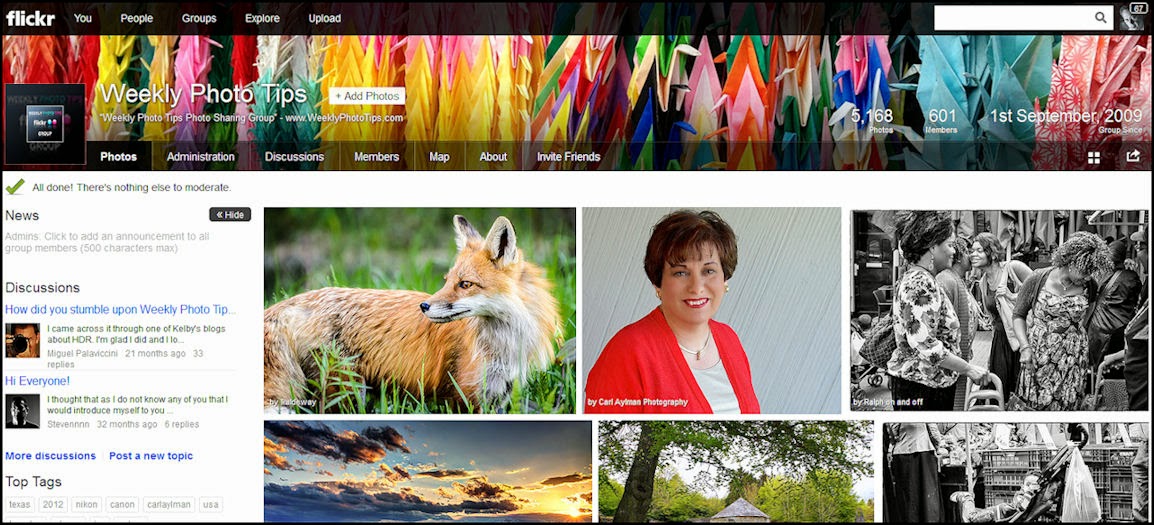
The first thing you will do is follow this link to our Flickr page. Once there, in the upper left page heading you will see a "+ Join Group" box that you will click on to join our group (see the screen shot below). To join the group you will need a Flickr account, if you don't have a Flickr account you will need to create one.
Once your request to join our group is approved (which will usually only take a few hours) you can return to our Flickr page and submit all images you would like.
As a member, when you return to our Flickr page you will find the "+ Add Photos" box in the exact same place that the "+ Join Group" was. (see the screenshot below).
The only thing we ask is that any images you upload to our group be "family friendly".
For easier viewing simply click on an image to view it larger and in a new window.
I hope that helps, if you still have questions do not hesitate to contact us and we will do what we can to get you up and running.
Check out the Photoflex Litedome Platinum Softbox...
My Photoflex softbox is by far one of my favorite lighting tools, and of all the gear I own, it is the one borrowed the most by my photography friends.
Right now not only does Adorama have the Photoflex Litedome Platinum Softbox on sale ($127), it also comes with a free grid (a $99 value), AND free shipping!
It durable, portable, comes with a 6 year warranty and the following features:
- Removable Face - adjust the natural, soft light to create just the right diffusion
- Removable Baffle - helps eliminate hotspots
- White interior panels
- Quick Release Corners - creates stronger corners and makes it easier to break down
- Suspension loops - suspends the light without Boom/Boom Stand
- Carry Bag - included for easy storage and transport
- Free grid - attaches to the face for better control and create different lighting effects
Below is our video review/demo of the Photoflex LiteDome ES, it is also on sale (with free shipping) and comes with Speedlight/Speedlite mounting hardware (with two cold shoe mounts, one for your flash and the other for the trigger), along with a light stand bracket (which also works nicely as a handheld device) and carry bag.
The Photoflex LiteDome ES is compact and so portable that it will fit in most large camera bags.
(For subscribers the video does not "push" through and you'll need to return to the blog to view the video, or you can head directly to our YouTube channel)
Your photo could be worth $15,000!...
Yup, $15,000, that's the top prize and there are multiple prizes under that as well.
The Weather Channel is in the midst of a photo contest, open to everyone (meaning amateur AND professional photographers)
They are looking for images that "showcase the passion of mother nature and capture the beauty and power she posses".
You have until June 15th (2014) to submit your entry.
Important social media reference links...
To follow up on yesterdays post on "Online Marketing Resources", we bring you a post from social media expert Andrea Vahl, who has gathered a lot of reference links for each and every social site that most of us use all the time.
So if you want the links to get the latest news, contact info, help email links (and more) to Twitter, Facebook, Google+, Pinterest and the rest of the social media "players" just follow this link to the great resource put together by Andrea.
Lexar Pro SDHC & CompactFlash memory cards are on sale!...
These are the memory cards I use (and love), not only are they on sale for incredibly low prices, they all come with free shipping as well!
Lexar 32GB Professional SDHC UHS-I 600x Class 10 Memory Card, 45MB/s Write Speed $16.95
Lexar 64GB Professional 600x SDXC UHS-I Class 10 Memory Card, 90MB/s guaranteed read transfer speed $42.95
Lexar 128GB Professional 600x SDXC UHS-I Class 10 Memory Card 90MB/s guaranteed read transfer speed $93.95
Lexar 16GB Professional 1066x CompactFlash Memory Card 160MB/s read transfer speed $48.95
Lexar 64GB Professional 1066x CompactFlash Memory Card 160MB/s read transfer speed $88.95
Lexar 16GB Professional 1066x CompactFlash Memory Card - Pack Of Two - 160MB/s read transfer speed $91.95
Lexar 32GB Professional 1066x CompactFlash Memory Card 160MB/s read transfer speed $63.95
Lexar 16GB Professional 800x CompactFlash Card 120MB minimum guaranteed sustained read speed $42.95
Lexar 64GB Professional 800x CompactFlash Card - 2 Pack - 120MB/s minimum guaranteed sustained read speed $184.95
A must read for online marketing resources...
Let's face it, if we don't have an effective online marketing plan, we are invisible to our potential clients.
One resource I use to help me to stay informed and to fine tune my online plan is Feldman Creative, written by Barry Feldman.
Barry recently posted "30+ Need-to-Read Resources on Online Marketing" which is a great starting point for anyone who would like to understand and then implement an online marketing strategy.
Head over to Feldman Creative and read this post, then subscribe to keep informed and up-to-date, you will find it to be time well spent.
Free "how to" webinar on Digital Asset Management...
The most important part of our workflow, heck, of any photography business is DAM (digital asset management), having a good workable system for rating, ranking, storing (and finding) your files is imperative to every photographer.
If you can't find a file, just how difficult does that make your day, how much time do you waste "hunting" down images? And worse, what if you can't find it?
On June 2nd you will have the opportunity to take a big step forward in managing your images.
You can register for this free online seminar with photographer and instructor Peter Krogh, he'll be talking about the methods covered in-depth in his new book, organizing your photos with Lightroom 5. Peter's book (and this webinar) will offer you a clear vision of the process of building an organized photo library, thus enhancing your workflow. He breaks the process down to three basic tasks: Store, Tag and Create. By using this method, you'll be able to find an organizational style and workflow that's right for you and your photography.
Topics to be discussed and covered:
♦ How to understand the difference between Store, Tag and Create
♦ How to create a solid storage structure for your image files
♦ Finding and filtering with tags
♦ How to use Keywords
♦ Using Locations tags
♦ How to use ratings effectively
And more.
Follow this link and you can sign-up for one of two seminars that will be offered on June 2nd, the first is at 1pm the second is at 3pm (EST).
30 days of FREE online photography training...
If you head right over to SkillFeed you can sign up today and get one months worth of free online training.
You will find classes for Lightroom, the entire Photoshop series of software, lighting, gear, and much more.
But you need to do it soon as this very generous free training offer expires at midnight.
We need our readers help identifying a font....
One of our readers recently wrote in with a question hoping that one of you good folks might be able to answer it.
Would anyone out there by chance know the name of the font in the picture below.
If you know it (or think you do) please leave your answer as a comment to this post.
My money is betting we will have the correct answer in no time.
Thanks everyone.
Nikon announces the new D4s!...
Today Nikon announced a new flagship camera, the Nikon D4s.
The D4s is a speed demon shooting 40% faster than the D4.
Here are a few more of the differences:
• Image Processing Engine D4S: EXPEED 4 30% faster Increased number of shots Higher video quality at high ISO Supports 1080 60p More shots per charge
(D4 Processing Engine EXPEED 3)
• ISO Sensitivity Range: 100 to 25,600 Lo1 (ISO 50) to Hi4 (ISO 409,600)
(D4 Range is 100-12,800 ISO)
• RAW SIZE S: 12-bit uncompressed
(D4 no)
• Advanced Scene Recognition System: Group Area AF added
• Face Priority analysis for viewfinder shooting: On/Off possible with custom setting
(D4 Always On)
• Spot White Balance when using Live View
(D4 No)
So if you have a spare $6500 you want to spend, or simply want to read more about the D4s and drool just follow this link.
Review of the Ruck Strap camera strap from HoldFast...
It seems like forever ago that I did the "unboxing" of the Ruck Strap camera strap from the good people (Mathew Swaggart) over at HoldFast.
And I have never done a joint review before, so today will be our first.
The UPS truck often stops at my front door, dropping off boxes of very cool camera gear, and never before has one of my daughters shown an interest in any of it (actually just the opposite, their eyes glaze over, a bit of drool from the corner of their mouth), but as soon as Katie saw the Ruck Strap her eyes shot open and she started asking questions, ending with "can I try this", to which I said "sure, but you have to write something about it".
So here is Katie's review of the Ruck Strap (and I will follow with a few words of my own).
"This camera strap is not only the coolest looking, but it
is extremely comfortable too! It has two pockets in the front for my memory
cards and two elastics in the back for extra batteries, it attaches to your
camera by adjustable leather straps and heavy metal buckles. It is so perfect
for me (or any photographer) so my pockets aren’t full of and I'm not fumbling
for batteries and memory cards. Which is great so I don’t have to carry my
camera bag around. By just attaching the strap to the camera you can tell it is
made out of quality and extremely durable materials (canvas, leather, and
suede).
I think another of my favorite things about the strap is
the soft suede backing against my neck, not the silicone, which I understand is
supposed to keep the strap (and my camera) from sliding around but really it
just makes my neck sweaty (gross!) and pulls my hair. The Ruck Strap is perfect
for any photographer."
It's a good thing I got to handle it first, because
Katie is NOT giving the Ruck Strap back to me.
As I said during the unboxing, both the packaging materials
and the care with which it was all put together were both amazing, I have never
been more impressed with all of the thought and care that went into preparing a
single item for shipping.
I concur with Katie regarding the quality of materials used
in this camera strap, I seriously doubt you will see it matched by other
products... based strictly on quality, it it is one of the best things ever sent
to me for review.
Combine that with the thoughtful design and clever layout (where you can
carry your batteries and memory cards) and the Ruck Strap is clearly a winner.
Lastly, I shoot weddings with a Nikon D3, so we are talking
a very long day with a heavy beast of a camera, and the Ruck Strap was just as
comfortable at the end of the day as it was in the beginning. And you will NEVER
have to worry about your strap coming loose from your camera.
So what do we have here, a camera strap that is comfortable
(with even long use), you have camera security, you have useful functionality...
what more can you ask for, seriously?
The
Ruck
Strap is not the least expensive camera strap you will ever buy, but in my
humble opinion it will be the best one you ever attach to your camera.
New year, new gear...
Nikon has just announced the new D3300, a camera that will produce stunning 24.2-megapixel photos and let you shoot 1080p Full HD videos with tack-sharp details. You can shoot at 5 frames per second, create high-resolution panoramas, and so much more. You can get the new Nikon D3300 along with a 18-55mm f/3.5-5.6G VR II Lens for just $646 (with free shipping). It is available in your traditional black, or the stunning "arrest me red".
Another new release from Nikon is the 35mm f/1.8G AF-S ED Nikkor Lens, for $596.
And one last new release from Nikon is the 18-55mm f/3.5-5.6G AF-S DX VR II Lens, for $196.
Not to be outdone, Canon has released a slew of new Powershot Cameras this morning and you can find them all at this link.
Subscribe to:
Posts (Atom)